For distributors and wholesalers

From incoming stock to customer collections, in one workspace.

TradeFlow Distribution Suite connects purchasing, inventory, sales and accounts in one browser workspace. Your team records supplier purchases, books customer orders, issues invoices and tracks payments, while managers see stock levels, outstanding balances and daily activity together.

  • Sales & returns
  • Purchasing
  • Stock visibility
  • Customer collections
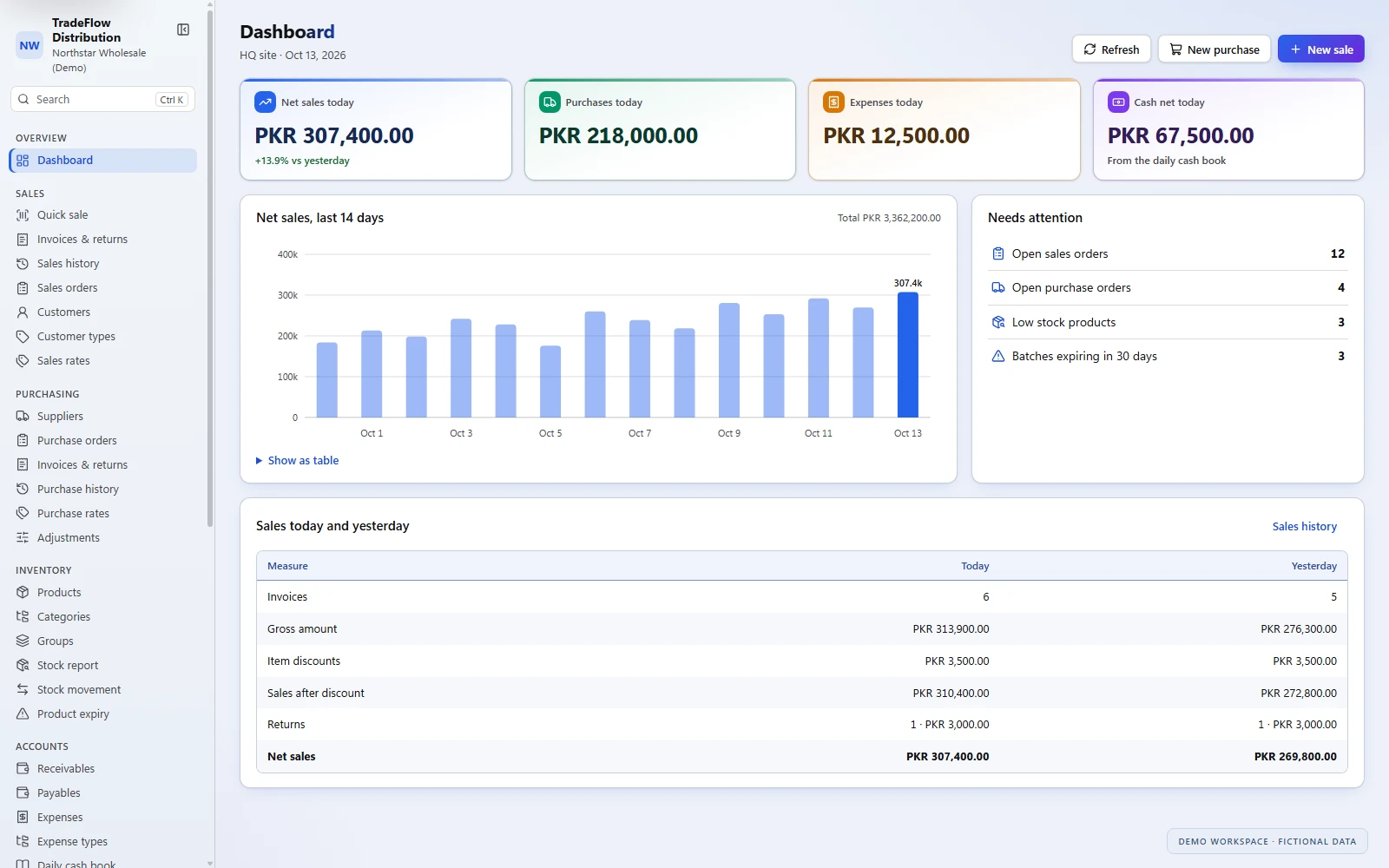
TradeFlow demo dashboard showing daily sales, purchases, expenses, cash activity, sales trend and items needing attention.
Daily activity and the items that need your team's attention, together on the dashboard.

How it works

Keep the daily trade moving

From supplier purchases to customer payments, TradeFlow brings the records your team needs into one system.

  1. 01

    Bring stock in

    Record purchase orders and supplier invoices, capture purchase rates and expiry dates where needed, and handle returns and quantity corrections.

  2. 02

    Book and invoice sales

    Create customer orders, prepare invoices or use Quick Sale for counter entry. Apply customer-type pricing, enter discounts and record cash or credit sales.

  3. 03

    Record money in and out

    Enter customer receipts, supplier payments and expenses. Review outstanding party balances and follow daily cash activity from the cash book.

  4. 04

    Review and act

    Check stock positions, nearing-expiry batches, sales performance and aging balances. Open the relevant report and export available tables as CSV.

Sales & customer orders

Every sale, with the details you need

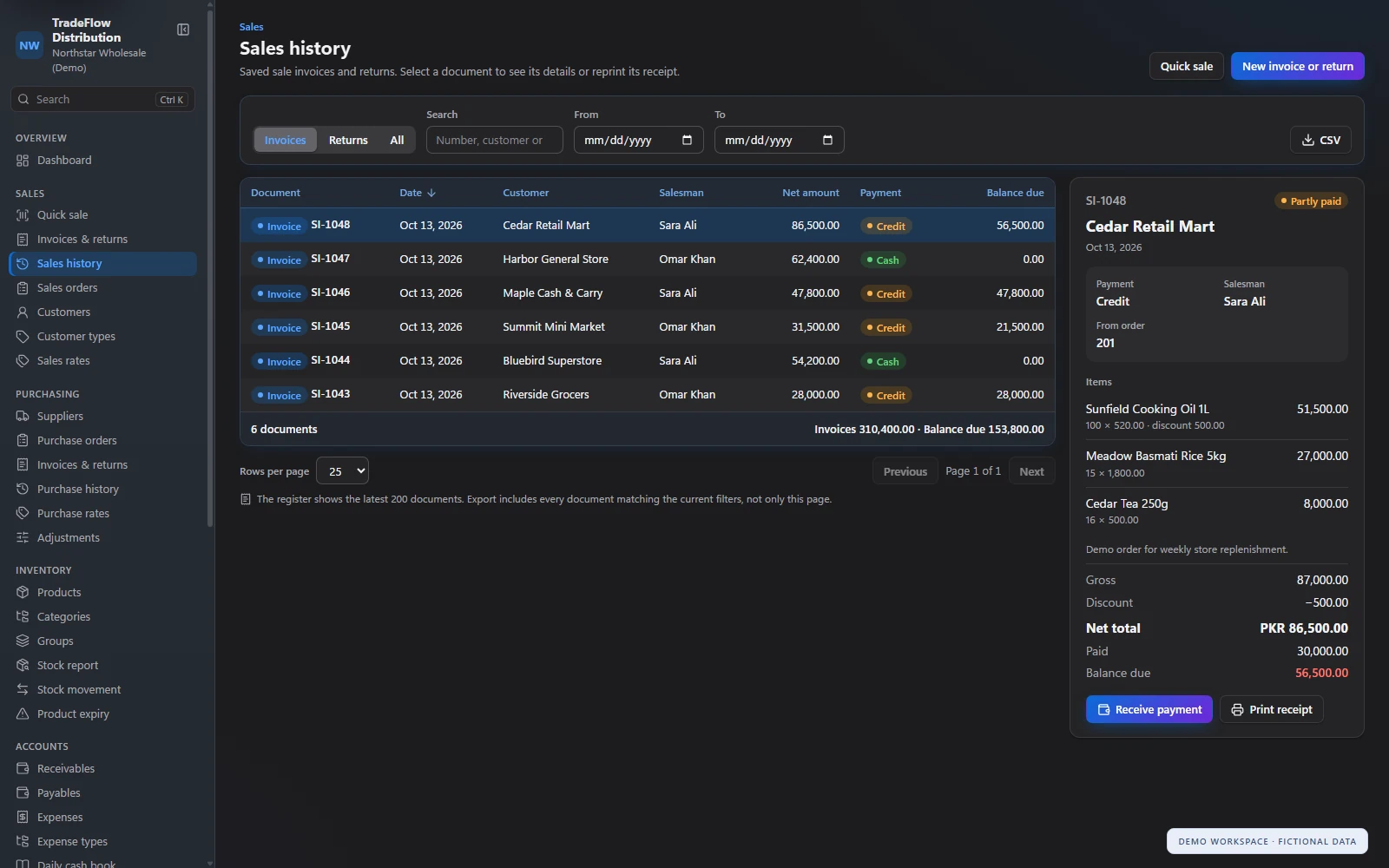
Book orders, create invoices and handle returns from the same sales workspace. Customer, salesman, product, quantity, rate and discount information stays with each document. The sales register shows cash and credit transactions, amounts paid and balances due, with document details and receipt printing close at hand.

  • Customer orders and invoicing status.
  • Full invoice entry and Quick Sale for counter transactions.
  • Cash and credit sales with partial payment recording.
  • Sales returns, document search and receipt reprinting.
TradeFlow sales register with fictional invoices and an open invoice showing items, partial payment and balance due.
Review sales, open an invoice and see the remaining balance without leaving the register.

Quick Sale

Keep counter sales moving

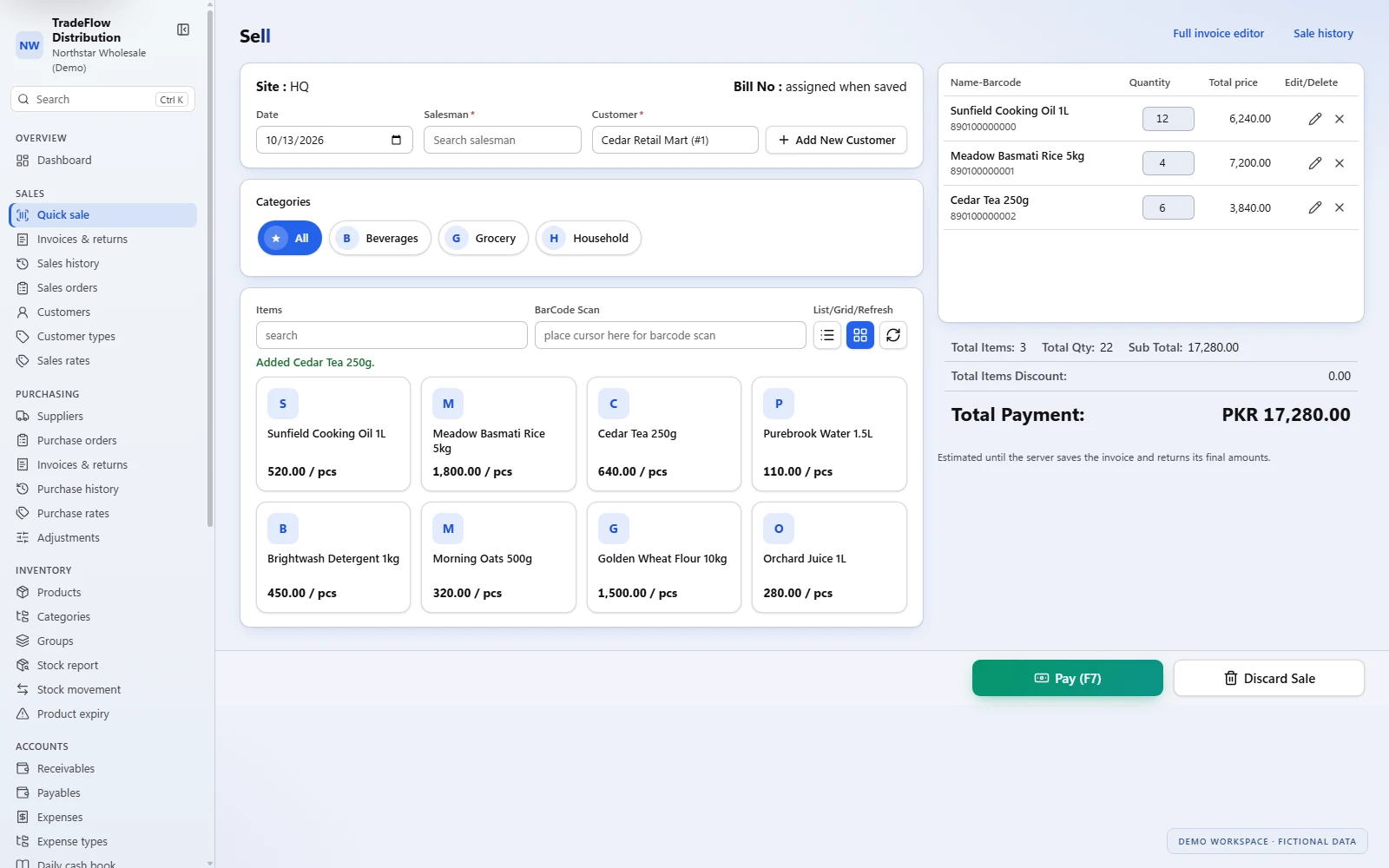
Choose the customer and salesman, find products in the catalog or enter a barcode, and build the sale in the cart. Adjust quantities, review item discounts and check the total before opening payment. Quick Sale uses the same sales invoice workflow as the full editor.

  • Search products and filter by category.
  • Add items to the cart and adjust quantities.
  • Review the total before choosing cash or credit payment.
  • Save the invoice and print a receipt through the payment flow.
TradeFlow Quick Sale in light mode with a fictional customer, product catalog, three cart items and payment total.
Choose products, adjust quantities and review the cart in Quick Sale.
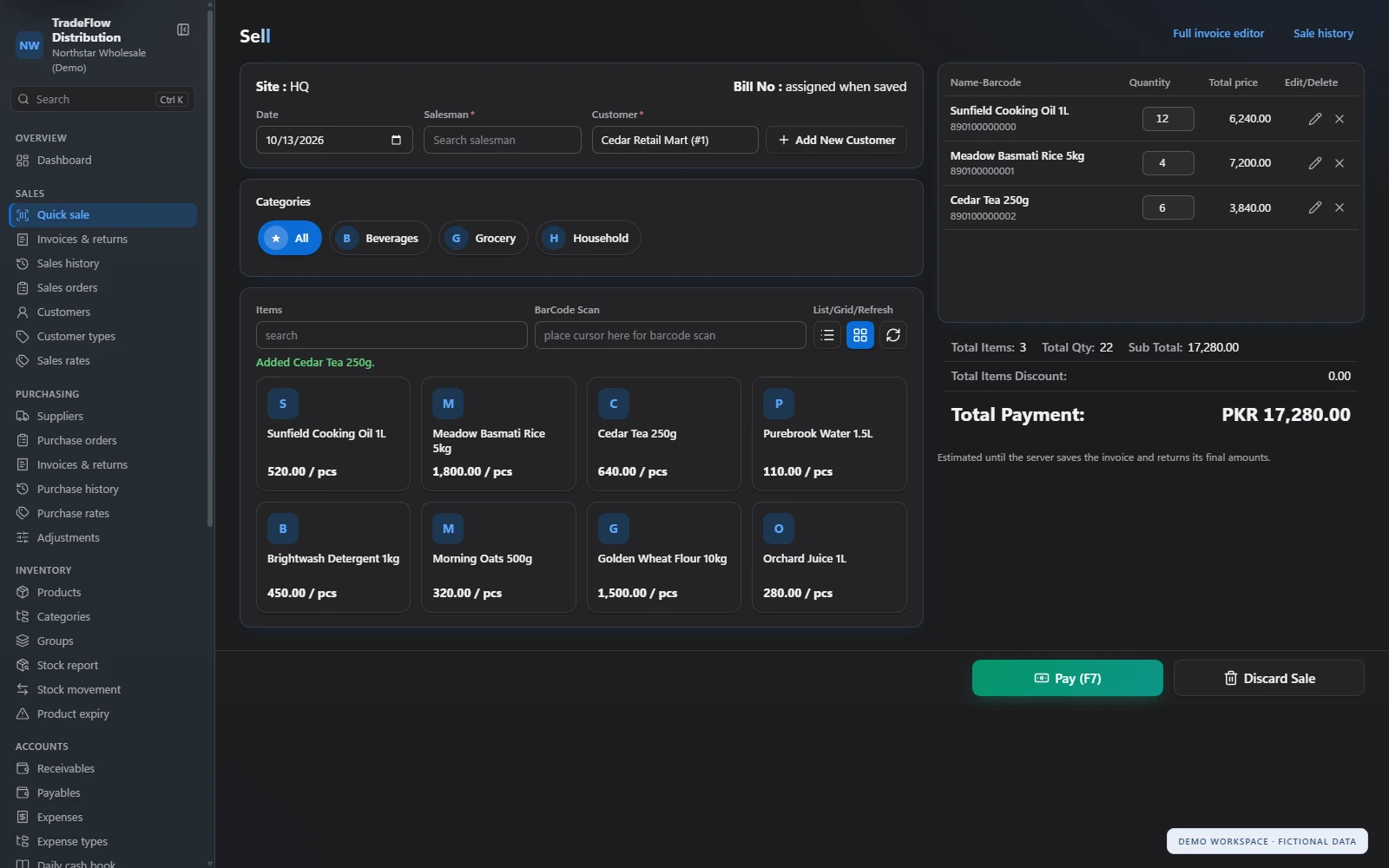
TradeFlow Quick Sale in dark mode with the product catalog, three fictional cart items and total payment.
Quick Sale keeps the catalog and cart together in dark mode.

Purchasing & rates

Start with the right supplier and the right rate

Maintain supplier records, purchase orders, invoices and returns. Supplier product lists keep purchase entry focused on the products that supplier provides, while standard and supplier-specific purchase rates support consistent entry. Date-effective rate changes preserve pricing history for documents entered against earlier dates.

  • Purchase orders, invoices and returns.
  • Standard and supplier-specific purchase rates.
  • Sales rates by customer type.
  • Effective dates and rate history.
  • Purchase adjustments covering one or more products.

Inventory & expiry

Know what is available, and what needs attention

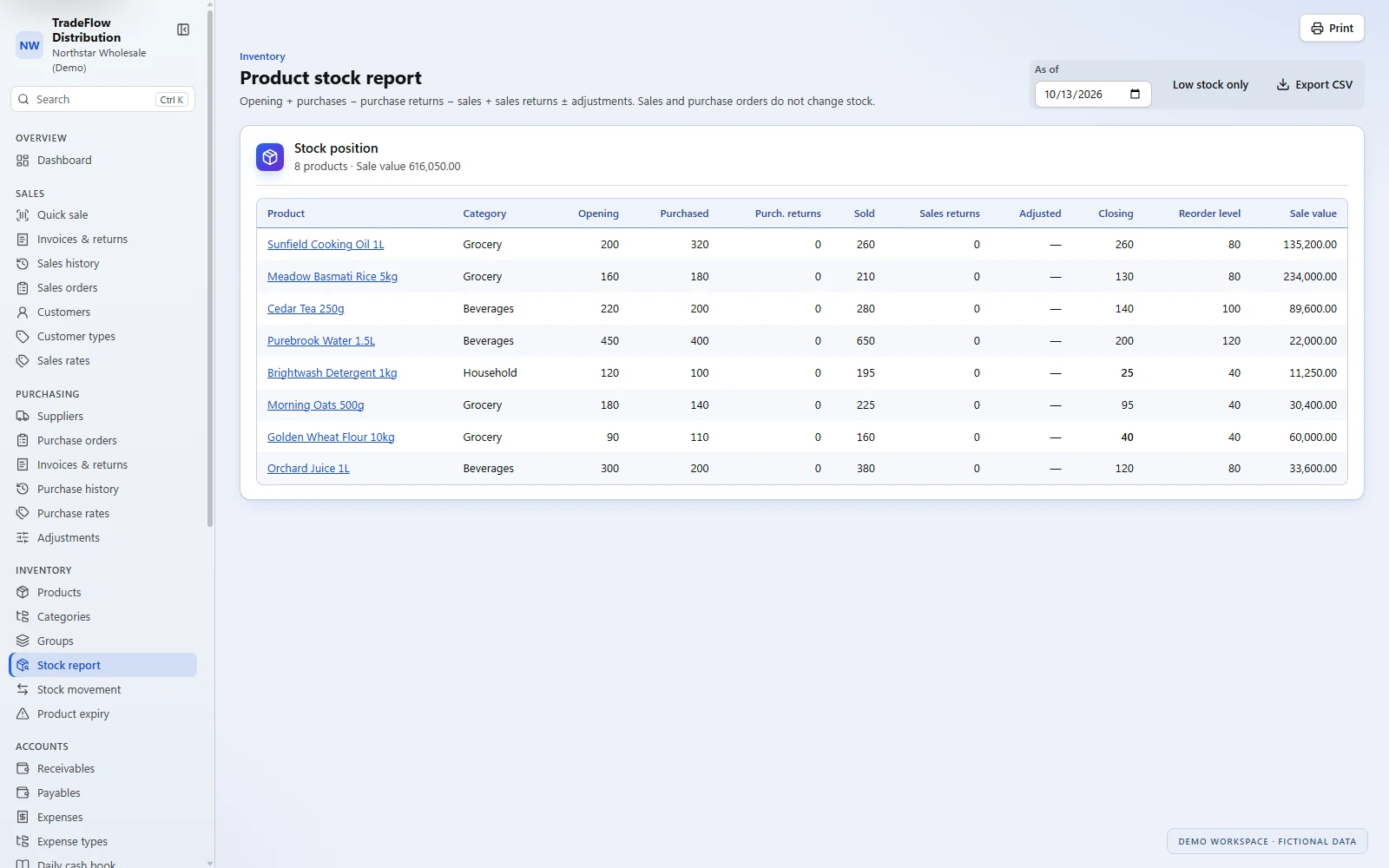
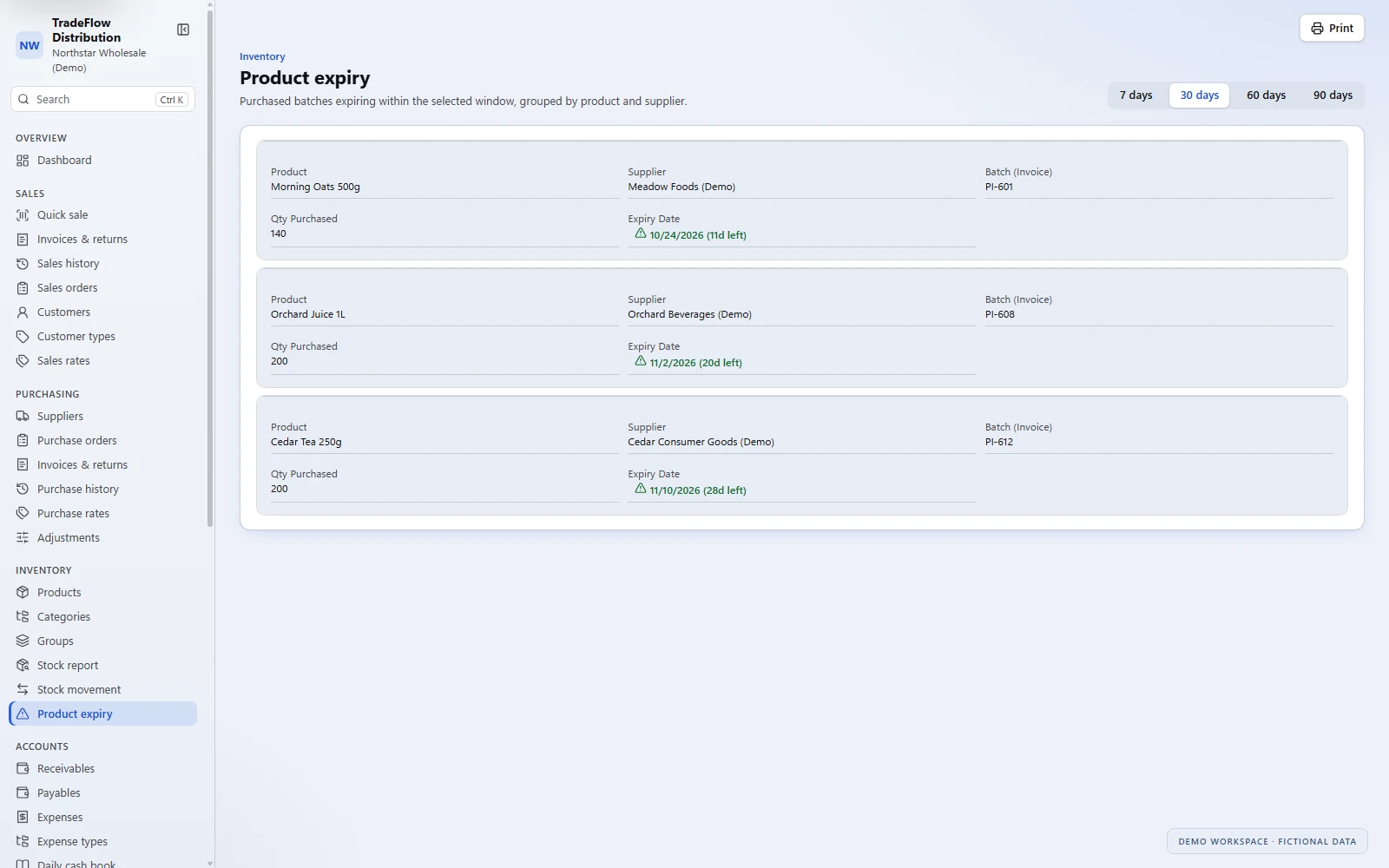
Review stock as of a selected date, see products at or below their reorder levels, and trace movements through purchases, sales, returns and adjustments. Record expiry dates on purchase lines and review purchased batches approaching expiry before deciding what to sell or replenish next.

  • Product catalog with barcodes, categories, groups and units.
  • Stock positions as of a selected date.
  • Low-stock filtering and reorder levels.
  • Product movement reports with running quantities.
  • Expiry views for purchased batches.
TradeFlow product stock report showing opening quantities, purchases, sales, closing stock, reorder levels and stock values.
See stock quantities and values, with a low-stock filter and CSV export.
TradeFlow product expiry view showing three fictional purchased batches with supplier names, quantities and expiry dates.
Review recorded purchase batches approaching expiry by product and supplier.

Receipts, payments & balances

See who owes you, and what you owe

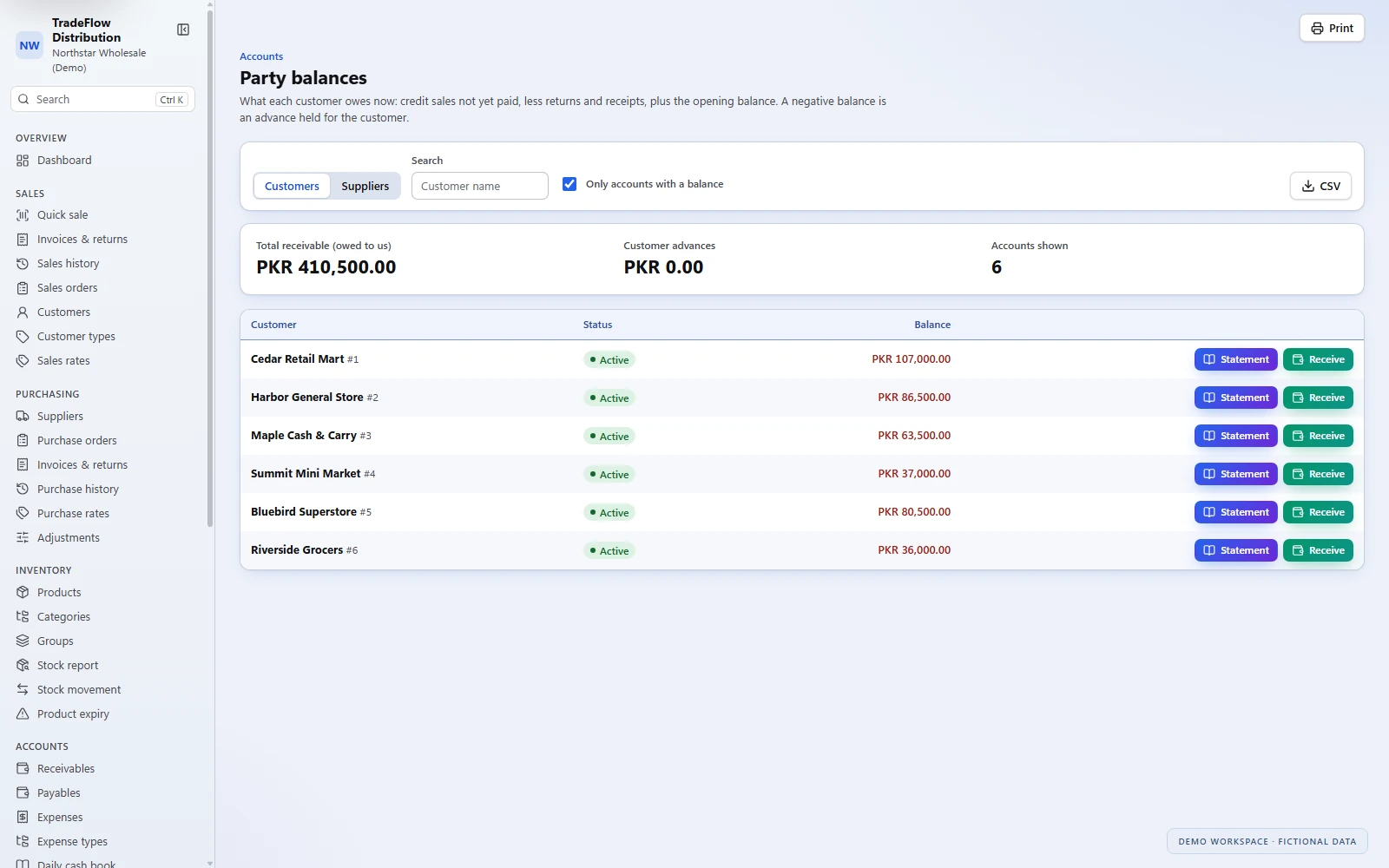
Record customer collections and supplier payments alongside everyday expenses. Party balances bring outstanding customer and supplier amounts into view, with links to statements and payment entry. The daily cash book gives your team a place to review recorded money in and out.

  • Customer receipts and supplier payment entries.
  • Outstanding balances and account statements.
  • Expense entries and expense types.
  • Daily cash book and report printing.
TradeFlow customer balances with six fictional accounts and links to statements and receipt entry.
Review customer balances, open statements and go straight to receipt entry.

Reports & daily oversight

Turn daily records into the next decision

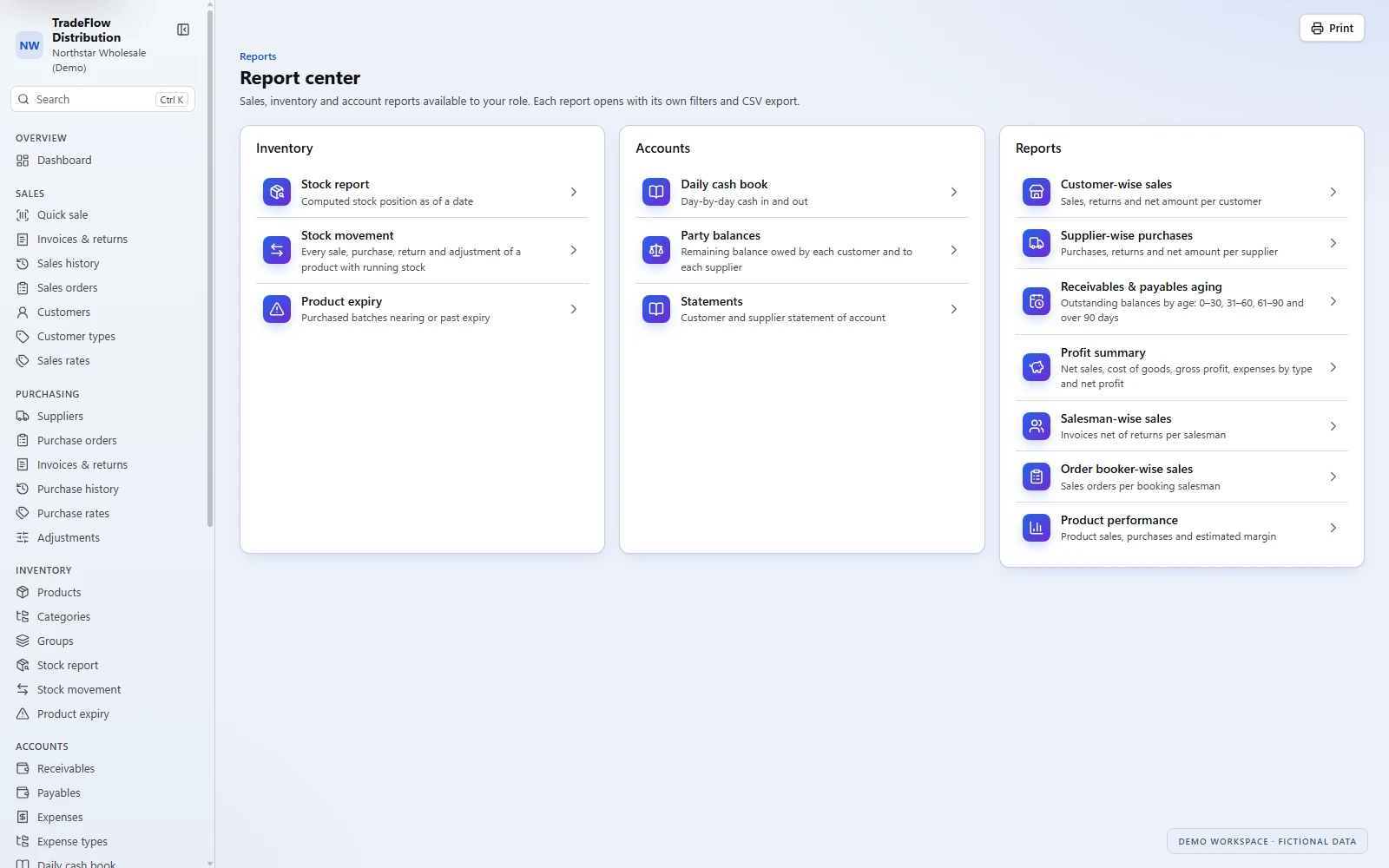
Start with a dashboard of daily sales, purchases, expenses and cash activity. Review open orders, low-stock products and nearing-expiry batches, then use the report center to explore sales, purchases, inventory and accounts in more detail.

  • Customer-wise sales and supplier-wise purchases.
  • Salesman and order-booker reporting.
  • Product sales, purchases and estimated margin.
  • Customer and supplier statements.
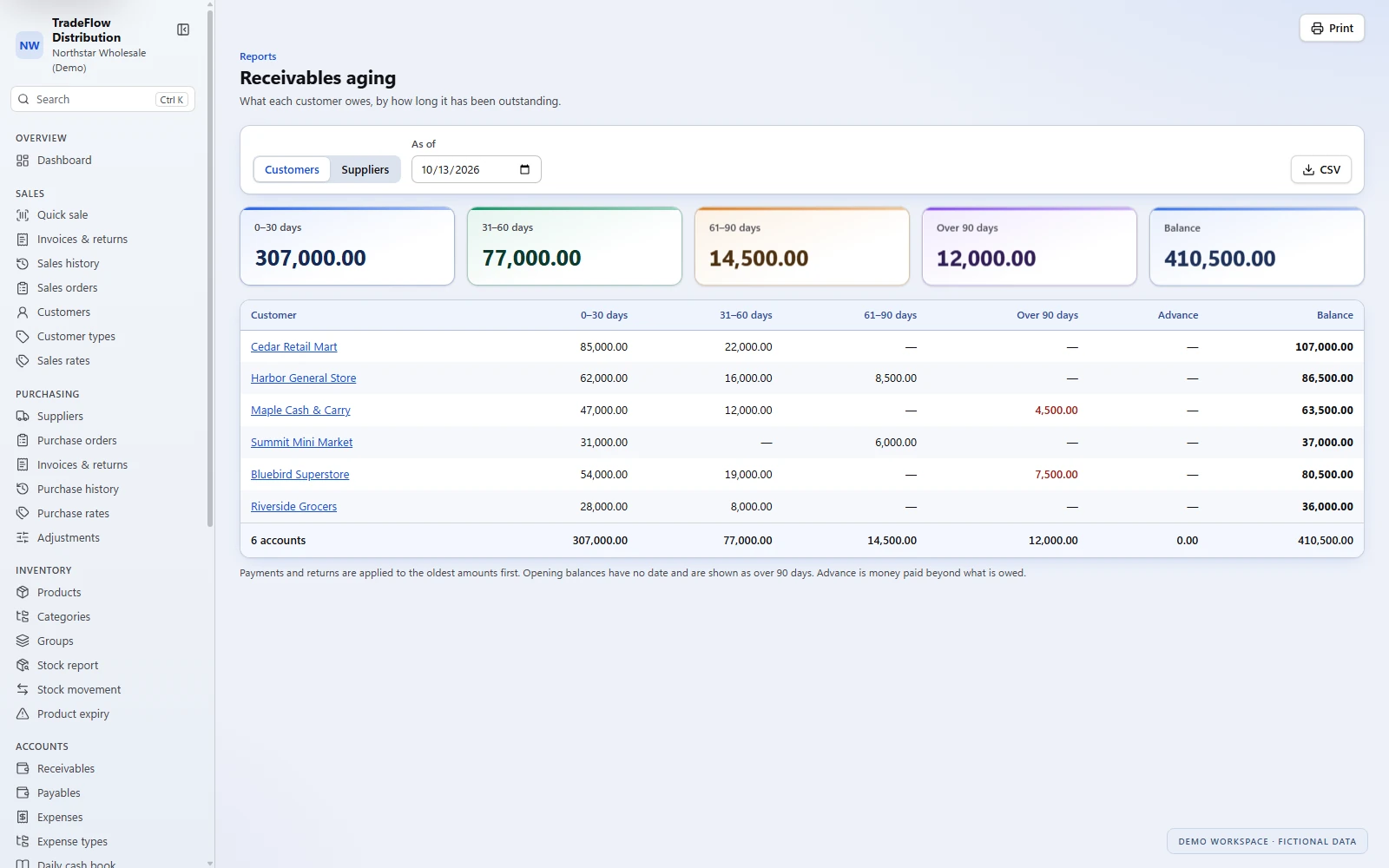
  • Receivables and payables aging.
  • Profit summary with estimated cost and expenses by type.
  • CSV exports on supported reports and registers.

Product margin and profit reporting use estimated costs; the figures should be reviewed against your agreed costing approach.

TradeFlow receivables aging showing fictional customer balances across four age bands.
Review outstanding customer balances across 0–30, 31–60, 61–90 and over-90-day bands.
TradeFlow report center showing inventory, accounts and sales reporting destinations available to the demo user.
Open the inventory, account and performance reports available to your role.

Built for daily operations

A shared workspace, with access suited to each role

Roles and permissions

Control access to sales, purchasing, accounts, reports and administration. Each person sees the screens and actions available to their permissions.

Company identity

Maintain company details and a logo, and configure the currency display, date format and numeric precision for your workspace.

Clear navigation

Move between modules through grouped menus and page search, with light, dark and automatic appearance options.

Change history

Review recorded changes through the audit log to help administrators understand activity in the system.

Your workspace, your appearance

A comfortable view for the working day

Choose light, dark or automatic appearance for your workspace. A soft sidebar, clear navigation and a subtle selection highlight keep the focus on your work, from the dashboard to the sales register and Quick Sale.

TradeFlow demo dashboard showing daily sales, purchases, expenses, cash activity, sales trend and items needing attention.
Light appearanceDaily activity and the items that need your team's attention, together on the dashboard.
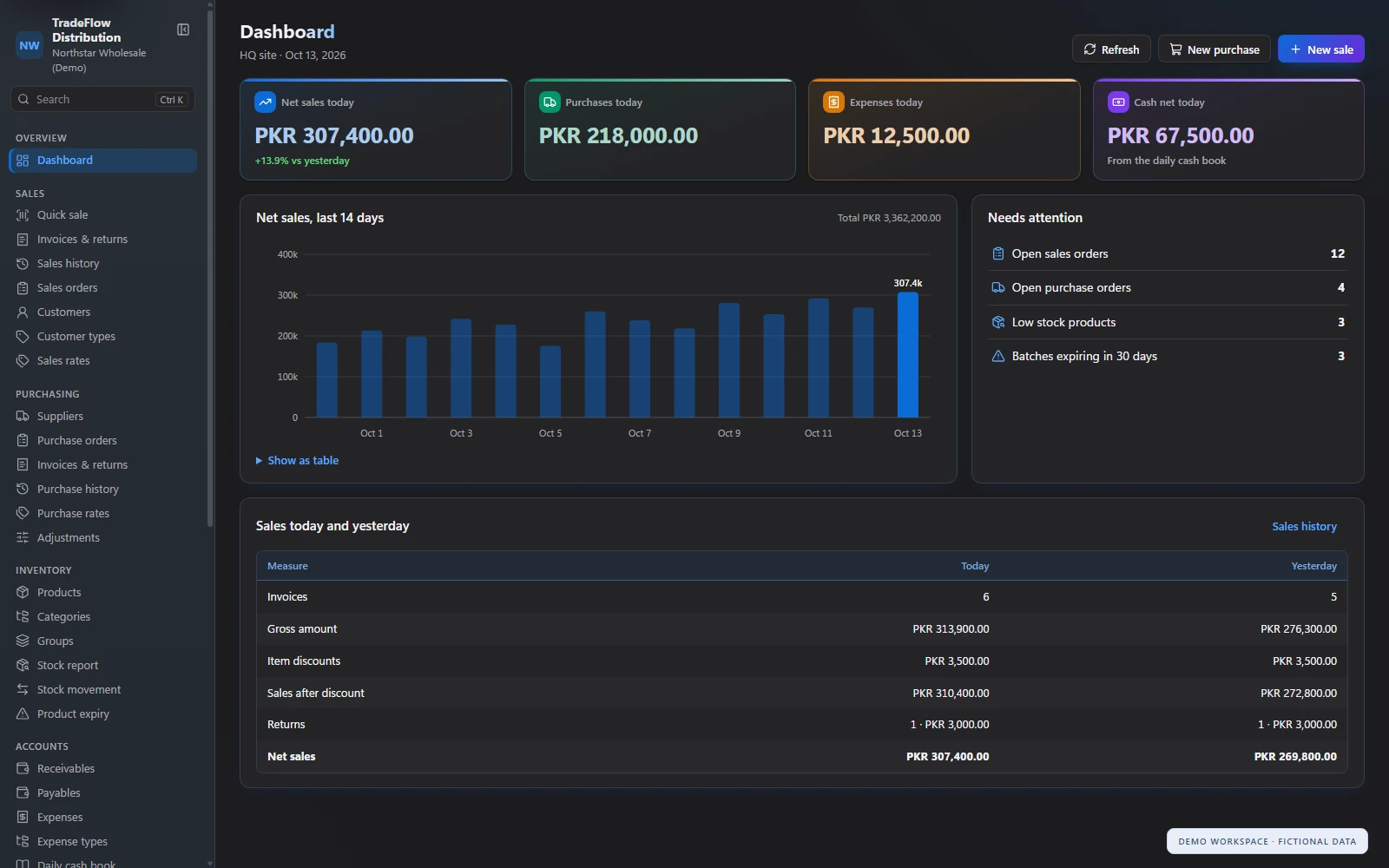
TradeFlow dashboard in dark mode showing daily activity, the sales trend and items needing attention.
Dark appearanceThe same daily overview in a comfortable dark appearance.
TradeFlow sales history in dark mode with a fictional invoice and partial payment details.
Dark appearanceReview documents and balances in dark mode.

The same distribution workspace in light and dark appearance.

Who it is for

For teams managing products, trade and collections

TradeFlow is designed for distributors, wholesalers and trading businesses that need purchasing, sales, inventory and accounts together. It suits teams serving retail customers, maintaining customer-type prices and handling both cash and credit business.

Questions

Common questions

Can we manage purchases and sales in the same system?

Yes. TradeFlow includes purchase and sales orders, invoices and returns, alongside inventory and account records.

Can we use different sale prices for different customers?

You can maintain sale rates by customer type. Standard and supplier-specific purchase rates are also supported, with effective dates and rate history.

Does it support credit sales and collections?

Yes. Record cash or credit sales, including partial payment amounts, and use customer receipts, balances, statements and aging reports to review collections.

Can we track stock and expiry dates?

You can review stock positions and product movements, filter low-stock products and record expiry dates on purchase lines for purchased-batch expiry views.

Can staff have different access?

Yes. Roles and permissions control access to modules and actions, including sales, purchasing, accounts, reports and administration.

Can we export and print records?

Supported registers and reports offer CSV export. Sales receipts can be printed or reprinted, and account and report pages provide print layouts.

Can CODEESK help us move from our current system?

Discuss your current records, workflows and deployment needs with CODEESK during the demo. The team can assess the setup and migration work required for your business.

Request a demo

See TradeFlow with your own distribution workflow in mind

Book a guided demo with CODEESK. We'll walk through purchasing, stock, invoicing, collections and reporting, and discuss how the suite would fit your products, pricing and team.

Request a demo

Screenshots show demonstration data.

Chat on WhatsApp